FunnyRolling out
Phone on the Train AI: Turn One Photo Into the Viral POV
A phone, a window and a perfectly timed glance.
The phone on the train clip is a small, relatable moment: someone half-looking at a phone by the window, then glancing up at the camera. This template keeps that timing and framing with your face in the seat.
All Funny templatesAlso searched as: phone on the train template · train reel ai · phone on train ai video
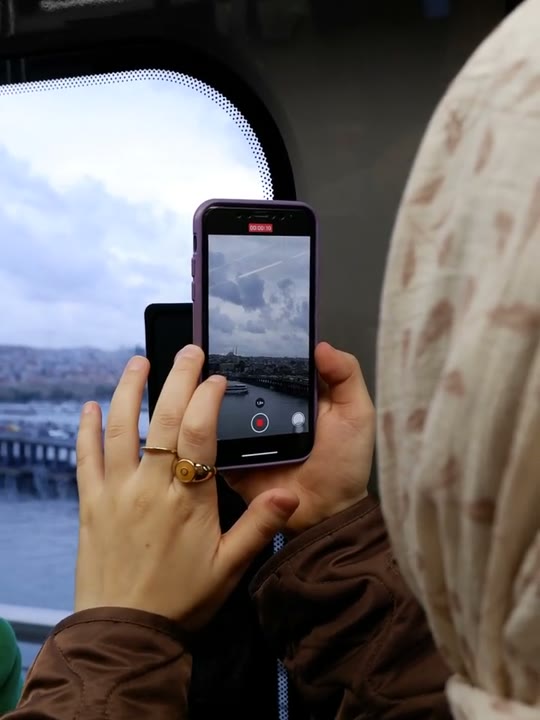
Reference clip (stock demo)
Sample clips are licensed stock footage that demonstrate each template’s motion.
What the phone on the train video looks like
The shot is close and quiet. The performer sits by a train window, holds a phone and lets the passing light move across the face before looking up. The reference runs about fifteen seconds and keeps the camera still.
There is no big gesture; the tension comes from the pause. That makes the clip easy to loop and easy to recognise with the sound off, and it gives the model a single face to hold steady.
How to make the phone on the train video on Shotonia
You do not need a train ticket or a window seat. The template supplies the setting, the phone and the glance; you supply one portrait.
- 1
Add your photo
Upload a sharp, front-facing portrait of one adult with the head and shoulders in frame and the eyes visible.
- 2
Choose a length
Six seconds covers the glance; 12 and 15 seconds hold the window light and the pause longer. One credit per second.
- 3
Generate
Confirm consent, start the render and download the vertical MP4 when it is ready.
Which photo works best
A neutral portrait with soft, even light gives the cleanest result. The template adds the train window and its moving light, so a photo that is already brightly backlit can lose the face.
Avoid photos where you are looking away from the camera or wearing something that covers the eyes. The glance is the point of the clip, and the model needs a clear face to build it. A plain background is easier to replace than a busy carriage.
The phone on the train prompt recipe
The template writes the prompt for you. It describes the seated pose, the phone in hand, the window light and the moment the performer looks up.
It also tells the model to keep your face and hair consistent while the light changes. That consistency is why a sharp, evenly lit photo matters more than a dramatic one.
Nothing in the recipe points to a real commuter, a real route or a specific post. The scene is generic, so the output is a new clip rather than a retelling of one person’s video.
One performer and one phone
The template needs one photo of one adult. The phone is part of the generated scene, so you do not need to hold one in your upload.
If your photo already includes a phone, a second person or a mirror, the model has more to track and the result can drift. Crop to a simple portrait first, and keep both hands out of the frame if you can.
How many credits does it cost
Pricing is one credit per second: 6 seconds for 6 credits, 12 seconds for 12 credits, 15 seconds for 15 credits. A failed render is refunded automatically and does not consume your balance.
Packs start at $9.90, and credits from packs do not expire. That makes a 6-second preview a low-cost way to test your photo before the full window-light version.
What happens in your phone on the train video
You get a vertical 9:16 MP4 without a visible watermark. The clip keeps the seated framing, the window light and the glance of the reference.
The template does not include licensed music. Add your own track where you post, or share it silent. When you publish it, tell viewers the video is AI-generated.
Where the phone on the train trend came from
The format draws on the everyday commute: a window, a phone and a moment of looking up. Because almost everyone recognises the setting, the clip needs very little explanation.
It also fits the way short video is watched: a small expression, a clear setting and a loop that rewards a second view. AI versions keep that structure and swap in the viewer without filming on a train.
Phone on the train aliases and related searches
People search for phone on the train AI, phone on the train template, train reel AI and phone on train AI video. All of them describe this template.
Related phrases include train window AI video and commute POV template. Browse the template center if you cannot find a specific phrase here.
What goes wrong, and how to fix it
Common problems are a face that is too dark against the window, a glance that looks mechanical or a phone that blends into the hand. A brighter, simpler portrait usually fixes the first two.
If the scene looks crowded, check that the upload contains only one person. Failed provider renders are refunded automatically, so retrying does not cost extra credits.
Frequently asked questions
What is the phone on the train trend?
It is a short, relatable clip of someone sitting by a train window with a phone, then glancing up at the camera. The setting and the small pause do most of the work.
Do I need to film on a train?
No. The template generates the train setting, the phone and the glance. You only upload one portrait and choose a length.
Which photo works best?
A sharp, front-facing portrait with soft, even light. Avoid strong backlight, covered eyes and photos where you are looking away from the camera.
Do I need to hold a phone in my photo?
No. The phone is part of the generated scene. Uploading a photo without a phone gives the model less to track and usually produces a cleaner result.
Do I have to write a prompt?
No. The template already describes the seat, the phone, the window light and the glance. Your only input is the photo and the clip length.
How much does a phone on the train video cost?
One credit per second: 6 seconds for 6 credits, 12 seconds for 12 credits, 15 seconds for 15 credits. Packs start at $9.90, credits never expire and failed renders are refunded.
How long does the render take?
Usually a few minutes. Queue length and the clip duration both affect the wait; you can close the page and find the finished video in My videos.
Can I use this template with a friend?
No. It is built for one performer and one photo. A second person in the upload can confuse the model, so crop the photo to one adult first.
Is the video watermarked?
No. The MP4 has no visible watermark. When you publish it, tell viewers the video is AI-generated.
Is this template live?
Yes. The reference clip and create flow are live. The sample is licensed stock footage that demonstrates the motion; your video is rendered from your own photo.
Can I use the clip commercially?
You can use your own generated clip on social accounts you run and in personal projects. Do not present it as real footage, and only upload photos of adults who gave permission.
Does the clip include sound?
No licensed music is supplied. Add a track you have the rights to where you publish, or share the clip silent. The quiet pause is designed to work without audio.
More AI video templates
Sample clips are licensed stock footage that show each template’s motion. They are not AI output and are not affiliated with the people or brands in the original trend videos. Template names are descriptive references only. Use only photos of yourself or adults who gave permission, and say the video is AI when you share it.
Your next video is one photo away
Pick a template, upload a portrait and download a vertical MP4.